
Managing multiple PDF files can quickly become messy, especially when you’re working with contracts, invoices, reports, assignments, or scanned documents. Instead of sending several separate files, the smarter solution is to Merge PDF files into one organized document.
A good PDF merger helps you combine PDF files quickly, keeps the original formatting intact, and makes sharing much easier. Whether you need to merge two PDFs or combine dozens of files, using an online PDF merge tool saves time and improves productivity.
In this guide, we’ll explain how to merge PDF files online, why it matters, and what features to look for in the best PDF combiner.
Table of Contents
What Does Merge PDF Mean?
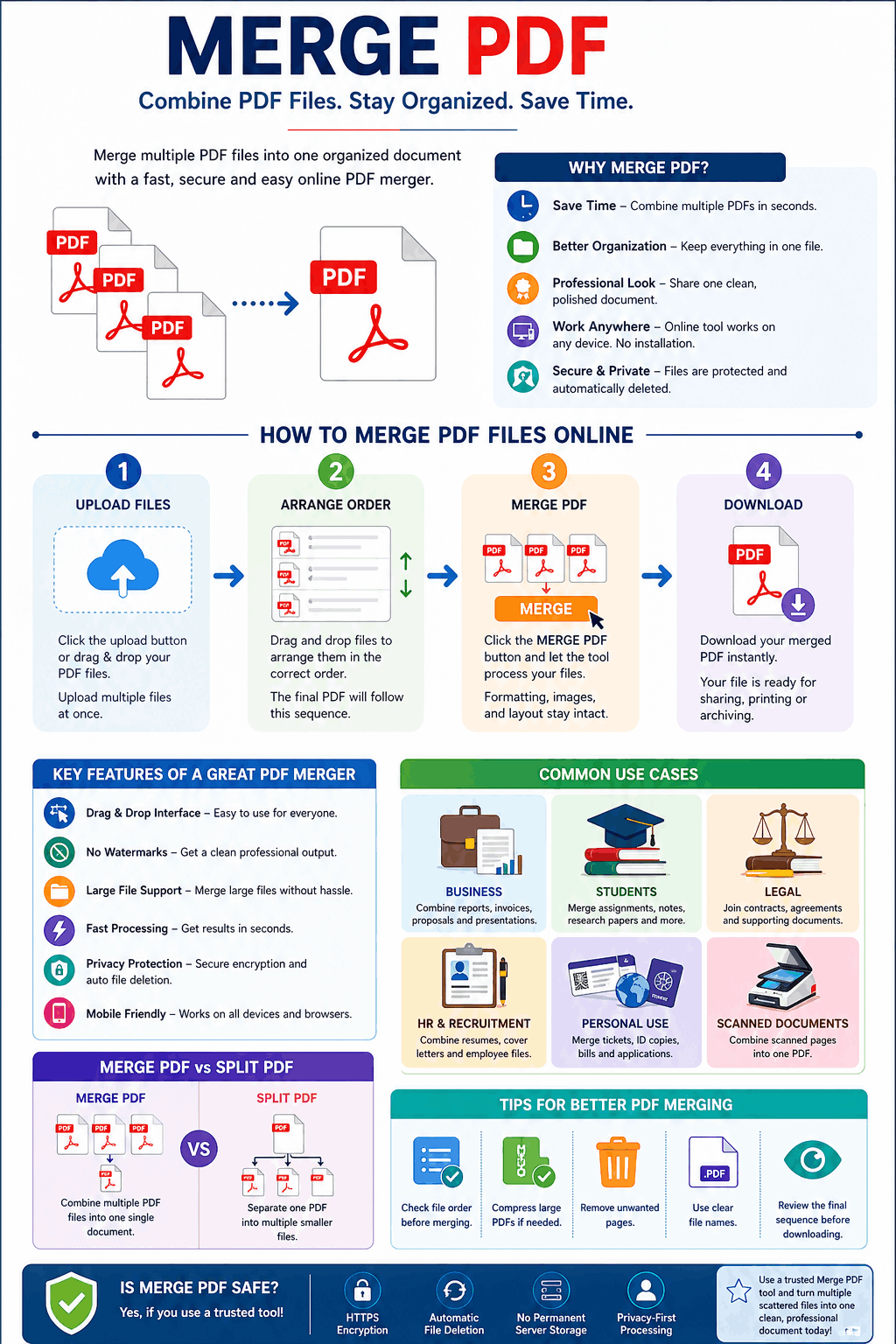
The term merge PDF means combining two or more PDF documents into a single file. This process keeps your pages together in the correct order so you can share, print, or store documents more efficiently.
For example, you may want to:
- Combine invoices into one monthly report
- Join scanned pages into one complete document
- Merge contracts and attachments
- Create one PDF from multiple chapters
- Organize study materials into one file
Instead of managing separate files, a PDF joiner helps you keep everything clean and professional.
Why Use an Online PDF Merger?
Using an online merge PDF tool is faster than installing heavy software like Adobe Acrobat. Most users simply need a quick way to upload files, reorder pages, and download the final document.
Key Benefits of a PDF Merger
1. Save Time
No need to manually recreate documents. A PDF combiner lets you merge multiple PDF files in seconds.
2. Better Organization
Keeping documents in one file makes storage and sharing much easier.
3. Professional Presentation
Sending one polished PDF looks far better than sending multiple attachments.
4. No Software Installation
A browser-based merge PDF online tool works on Windows, Mac, Android, and iPhone without downloads.
5. Secure Document Handling
Many modern tools offer secure file processing with automatic deletion after completion.
How to Merge PDF Files Online
Using a free PDF merger is simple and requires only a few steps.
Step 1: Upload Your PDF Files
Click the upload button or drag and drop your files into the tool.
Most tools support multiple uploads at once, making it easy to combine PDF files quickly.
Step 2: Arrange File Order
Reorder your documents by dragging them into the correct sequence.
This step is important because the final merged PDF will follow the exact order shown.
Step 3: Click Merge PDF
Press the Merge PDF button and let the system process your files.
A quality tool preserves:
- Text formatting
- Images
- Fonts
- Layout
- Hyperlinks
- Page dimensions
Step 4: Download Your Combined File
Once processing is complete, download your final merged document instantly.
Your new file is now ready for sharing, printing, or archiving.
Features to Look for in the Best PDF Merge Tool
Not all tools are equal. The best PDF merge online solution should offer more than just basic merging.
Drag and Drop Interface
A smooth drag-and-drop experience makes file arrangement much easier.
No Watermarks
A good free PDF merger should not add unwanted branding to your final document.
Large File Support
Some tools limit file size or number of uploads. Choose one that supports larger projects.
Fast Processing Speed
Nobody wants to wait minutes just to merge documents.
Privacy Protection
Secure PDF processing is critical, especially for contracts, legal documents, or business reports.
Mobile Friendly
A responsive design helps users merge PDFs from smartphones and tablets.
Common Use Cases for Merge PDF Tools
Business Documents
Combine reports, invoices, proposals, and presentations into one professional PDF.
Students and Education
Merge assignments, lecture notes, research papers, and scanned documents.
Legal Files
Join contracts, agreements, and supporting documents for easier review.
HR and Recruitment
Combine resumes, cover letters, and employee records.
Personal Use
Merge travel tickets, ID copies, utility bills, and application documents.
Merge PDF vs Split PDF
Many users confuse Merge PDF with Split PDF, but they serve opposite purposes.
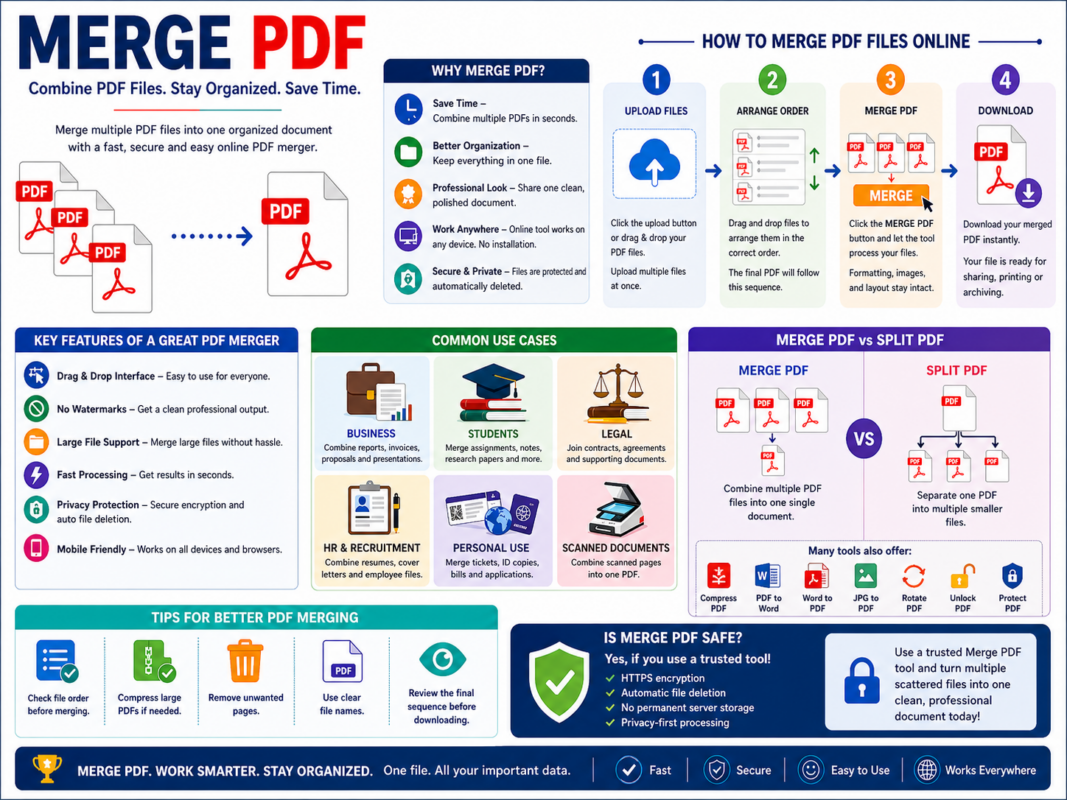
Merge PDF
Combines multiple PDF files into one single document.
Split PDF
Separates one PDF into multiple smaller files.
Both are essential PDF tools, and many platforms offer them together along with:
- Compress PDF
- PDF to Word
- Word to PDF
- JPG to PDF
- Rotate PDF
- Unlock PDF
- Protect PDF
Using these tools together creates a complete document management workflow.
Tips for Better PDF Merging
To get the best results when using a PDF merger, follow these tips:
Check File Order First
Most merge mistakes happen because files are arranged incorrectly.
Compress Large Files
If your PDFs are too large, use Compress PDF before merging.
Remove Unwanted Pages
Delete unnecessary pages before combining files.
Use Clear File Names
Naming files properly makes the merge process much easier.
Review Before Downloading
Always preview the final sequence before clicking merge.
Is Merge PDF Safe?
Yes—if you use a trusted tool.
A secure merge PDF online free tool should provide:
- HTTPS encryption
- Automatic file deletion
- No permanent server storage
- Privacy-first processing
Some advanced tools even process files directly in your browser for extra security.
Avoid unknown platforms that do not clearly explain how your files are handled.
Final Thoughts
A reliable Merge PDF tool is one of the most useful online utilities for both personal and professional work. It helps you combine PDF files quickly, stay organized, and share documents more effectively.
Whether you need to merge reports, contracts, scanned pages, or study materials, a fast and secure PDF combiner can simplify your workflow dramatically.
The best part is that modern tools let you merge PDF online for free without software installation, technical skills, or wasted time.
If you regularly work with documents, using a high-quality PDF merger is no longer optional—it’s essential.
Start using a trusted Merge PDF tool today and turn multiple scattered files into one clean, professional document.